
Switch Audience
Keeping Your Server Current — The Case for Regular Updates

Book Index
Chapter Weight
22
Why do it this way?
Your server is a machine running software. Software has bugs. Some of those bugs are security vulnerabilities — meaning someone, somewhere, has figured out how to walk through a door that the developers didn't know they left unlocked. The moment that vulnerability becomes public knowledge, automated tools start scanning the entire internet looking for unpatched servers to exploit. Not your server specifically. Every server. All of them. All the time.
This is not paranoia. This is just how the internet works.
The good news is that the Debian and Ubuntu teams — and the maintainers of essentially every package your server runs — fix these vulnerabilities quickly when they're discovered. The fix exists. It's sitting in a repository right now, waiting for you to ask for it. The only thing standing between your server and the vulnerability is whether you ran the update command this week.
A server that hasn't been updated in six months is not a stable server. It is a server with six months of accumulated risk. There's a difference. Stability comes from knowing what's on your machine and keeping it current — not from leaving it alone and hoping nothing happened while you weren't looking.
The other reason to update regularly is simpler: smaller updates are easier to manage than big ones. If you update every week or two, each update is a handful of packages. If you wait a year, you're looking at a large batch of changes that are harder to reason about and more likely to interact in unexpected ways.
Think of it like oil changes. You can skip a few. The car will probably be fine. But at some point you're not being careful — you're just getting lucky.
How to do it:
Log into your server and run these two commands:
sudo apt update
sudo apt upgrade -y
Image
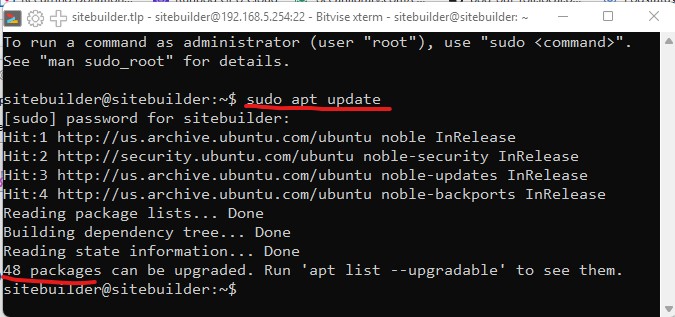
`apt update` refreshes the list of available packages — it checks the repositories for what's new. It does not install anything.
`apt upgrade` then installs the available updates. You'll be shown a list of what will change and asked to confirm.
The ' -y' after upgrade simply assets that yes you want to do this - If you forget the ' -y' the server will ask if you want to do this and then you type "y" to affirm your command.
Do this regularly — weekly is a reasonable rhythm for an active server. Monthly is the minimum. After major Drupal updates or new module installs, it's a good habit to run a server update pass as well just to keep everything tidy.
After some updates — particularly kernel updates — you'll be prompted to reboot. Don't skip this. The old kernel is still running until you do, which means the security fix isn't actually in effect yet.
The upgrade command may print a lot of text to the screen as it runs through its installations - there is a quiet satisfaction watching it scroll by.
That's it. Two commands. The whole operation usually takes under two minutes.
One more thing worth knowing: when you run
apt update, Ubuntu is checking a list of software repositories — essentially a curated list on your server of places on the internet where packages live. By default that list covers the official Ubuntu repositories, which is most of what you'll ever need. But occasionally a piece of software lives somewhere else — a vendor's own repository, a third-party source — and to install or update it, you have to add that source to the list on your server first. We'll cover that when we get to software that needs it. For now, just know the list exists and that apt update is only as complete as the sources it knows about.Alterative Options
Ubuntu offers a tool called **unattended-upgrades** that can apply security updates automatically in the background. It's worth knowing about — and in a future article we'll offer a script that handles this for you in a controlled, logged way. For now, doing it manually keeps you aware of what's changing on your machine, which is a good habit when you're still learning your way around the server. Knowing your server is as important as keeping it patched.